


This is a wood elf archer as she appears in the game, and the interesting part is the hole. The gap between the bow's stave and its string is genuinely see-through, so grass shows through it when she stands in a field.
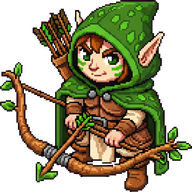
Getting there took five passes of pixel processing, a prompt change and a one-off repair run, because a generated image does not arrive as a sprite. It arrives as a picture of a subject sitting on a flat magenta field, and the whole difficulty is separating those two things without eating the subject.
Adam's side of this is short and involves none of the above. He names a unit and roughly what it is for, looks at what comes back, and says when it is wrong. He does not write the description that generates it; that paragraph is written here, out of the name. Every asset in this pipeline exists because a line in one of his lists named it, and the reason there are five passes rather than one is that he kept looking at sprites and finding things I had not.
This is the first stage of three. A written paragraph becomes a sprite here, that sprite becomes a 3D building with nothing else drawn in between, and the units that need a skeleton break off that path and go back to being done by hand. Which means an archer whose bow is filled in solid is not one wrong picture. It is one wrong picture that will be rebuilt in three dimensions and shipped, so everything below is upstream of a lot.
A sprite, for anyone arriving without the vocabulary, is the flat picture a 2D game draws to represent a thing: one image per unit and per building, with a transparent background so the ground shows around it. It is the whole of what a unit looks like in the classic top-down view.
The pictures themselves come from Gemini's image generation, which takes a paragraph of text plus optional reference images and returns a picture.
Three things go into every request, and only one of them is words. There is the paragraph describing the subject, written here rather than by anyone. There is a shared style sentence carried by every prompt in the game, asking for 90s real-time strategy pixel art, bright, saturated, bold outlines, then spending as long again saying what it must not be. And there is a picture: an already-finished asset from the same set, attached as a reference, because the words hold a dozen images together and will not hold three hundred.
Removing a generated background without eating the subject
Generating on a bright magenta field is a chroma key, the same trick as a green screen in film: pick a colour nothing in the subject will ever be, put it behind, and cut it out afterwards. The obvious way to cut it out is to delete every pixel that matches. That does not work, and the reason it does not work is the single most useful thing in this post.
Dwarf skin tones, light purple armour and the pink in an open wound all satisfy the same colour test as the background. Deleting by colour punches holes clean through all of them, which is exactly what the first version of this did.
So the background is not defined by its colour. It is defined by being connected to the edge of the frame. The cutout starts from every background-coloured pixel along the top row, the bottom row and both side columns, and spreads inward neighbour by neighbour, clearing only pixels it can actually reach. A pink highlight in the middle of a subject is enclosed, never reached, and survives untouched. That is two sentences of description and it is the entire technique.
The colour test itself is the other half, and it is not an equality check against a fixed magenta with a tolerance around it. It is a relationship between the red, green and blue channels:
// Not "is this pixel close to #FF00FF", but "is green pushed down relative to
// both red and blue", which holds across every magenta the model actually
// returns.
const isChroma = (r, g, b) =>
  r > 150 && g < 120 && b > 80 && (r - g) > 60 && (b - g) > 20;
The reason for that shape is that the model does not return the magenta it was asked for. It returns pure magenta sometimes, hot pink around 230, 12, 156 other times, and washed-out pinks around 200, 80, 150 in the same batch. A fixed target colour with a distance threshold either misses the pale pinks or starts eating the subject, and widening the tolerance to catch the pale ones is what makes it eat the subject faster.
Four more passes exist, each because of something visible that the first one left behind. One clears background trapped inside the frame, which happens with the scaffolding on half-built buildings where the field pools inside a lattice. One kills fringe, using a stricter test and requiring that the pixel touch an already-transparent neighbour. One is a despill over a two pixel band along the new edge, pulling red and blue down towards green so a magenta rim goes neutral instead of being cut away. The last drops small stray islands, keeping the largest piece and anything at least a quarter of its size.
Then a hole-filling pass runs three times over the subject. For every transparent pixel it looks at a 7 by 7 neighbourhood, and if at least 40% of that neighbourhood is opaque it fills the pixel with the average colour of those neighbours. The holes it repairs are anti-aliasing damage. Where a cream roof met the magenta field, the blended border pixels went pinkish, the cutout removed them as background, and the roof came back perforated.
Only after all of that does the crop run, and the crop is the easy part: trim to the subject, then place that into a transparent frame of the target size.
Sizes are arithmetic, not taste
No sprite resolution is picked in this project. It falls out of how many grid tiles the thing occupies. A tile is 32 pixels across, the camera zooms in to three times that, and a further factor of two of headroom keeps a sprite from going soft at maximum zoom. Multiply those together and one tile of footprint is worth 192 pixels of sprite.
So a one-tile ground unit is 192 by 192. A two-tile flying unit or tower is 384 by 384. A three-tile barracks is 576 by 576, and a four-tile town hall is 768 by 768. Buildings that are not square get sprites that are not square from the same sum, so a structure three tiles wide and four deep is 576 by 768.
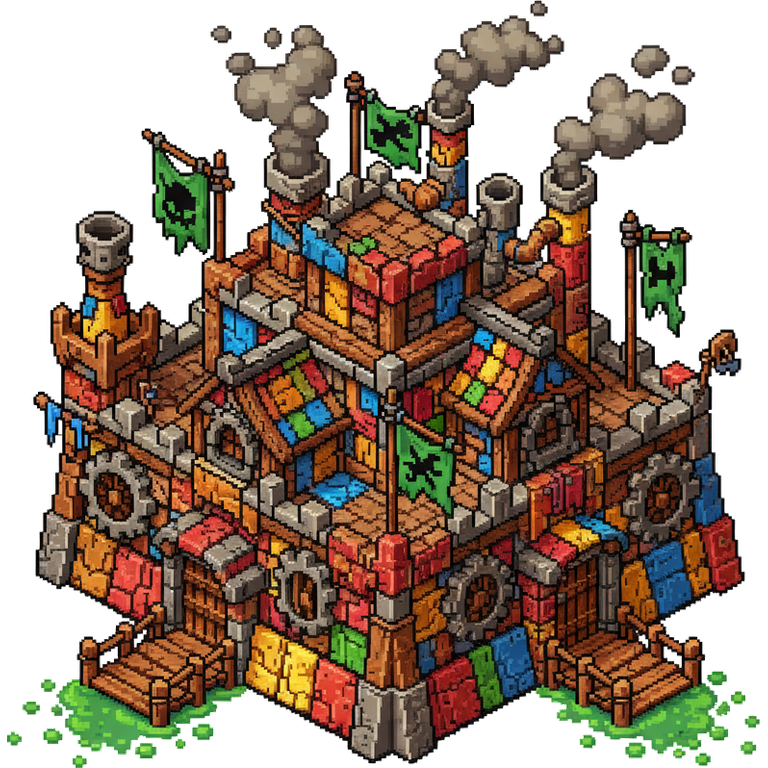
That is the goblin town hall at 768 by 768, and it is worth a second look for another reason. Its prompt asks for something built out of scavenged scrap, and every plank sits at a slightly different angle. When these sprites are fed to an image-to-3D service to make the game's models, symmetry is switched off for exactly this fortress's sake: forcing the two halves to match would tidy it into something that is no longer a goblin building.
Getting a non-square image out of an image model
Image models return square pictures by default. A building two tiles wide and four deep, asked for as a square, comes back square, and the crop then pads the canvas so the subject ends up far too short for its footprint.
The workaround is not documented anywhere and it is four sentences long. Make a blank image at the exact proportions you want, at any resolution, because only the ratio is read. Attach it as the last picture in the request. Say in the prompt text that the final attachment is an aspect reference and nothing else, and say "last" out loud if you are attaching style references too. Then stop asking for the subject to fill the frame, because a fill instruction and an aspect reference pull against each other and the fill instruction wins.
Two blank templates live on disk, one 1920 by 1080 and one 1080 by 1920, and one of them is attached whenever a sprite's footprint is not square. State the caveat honestly: this is a behaviour, not a documented feature. It is verified here against Gemini 2.5 Flash Image for sprites and Gemini 3 Pro Image for the wider plates, and a model update could stop it working without anything appearing in a changelog. Check the dimensions of the first image of every run rather than trusting it silently.
One facing, mirrored
Units are generated once, not eight times. The prompt asks for a single subject facing down towards the viewer in an isometric three-quarter view, and the renderer produces every other heading from that one image.
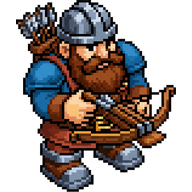
Right, up-right and down-right are that same sprite drawn flipped horizontally, which is why every unit in this game is designed symmetrical enough to survive being mirrored. Buildings never get that treatment, because they are drawn in a fixed isometric view where mirroring would flip the light source and put the shadows on the wrong side, so every building prompt carries its view instruction explicitly.
The panel strung across every archer's bow
Every archer in the game shipped with a solid pink panel filling the gap between the bow's stave and its string. Not a fringe around the edge, a filled shape, on every archer of every faction.
It was found the way art bugs are found here, which is Adam looking at a unit and saying it is wrong. Two mistakes had compounded. The reference image handed to the model was itself a cut-out with real transparency, and given transparent pixels the model has to decide what sits behind them, which for source art like this it reliably decides is pink. Then the cleanup pass, seeing a pink shape that was fully enclosed and therefore not connected to the border, correctly refused to delete it as background and repainted it plum instead.
Both halves were fixed in July. The prompt gained language saying that any see-through gap in equipment is empty background, naming the opening inside a bow between stave and string, the space inside a wheel, a shield's ring and a buckle, all to be filled with plain white and never with pink. And every reference image is now flattened onto solid white before it is sent.
That second half is the rule worth carrying away. Never hand an image model a reference picture that still has a transparent channel. It has to put something behind those pixels, and what it puts there is not your background. Flatten every reference onto a flat opaque colour before you send it, and when a shape you never asked for keeps appearing in the same place, look at what you are sending before you look at what you are asking for.
The sprites already on disk needed a separate repair, and the tool that did it is opt-in for a reason worth reading. It finds enclosed pockets over 150 pixels with a compactness above 0.30 and clears them, and it sits behind a switch because that fill shares both its hue and its shape statistics with a dark elf's robe highlight. Every automatic threshold that caught the elf bows also caught the healer's robe. Seven bow-carrying units were fixed by hand-triggered runs rather than by making the pipeline cleverer, which is occasionally the right answer.
Measuring a corpse instead of eyeballing it
The best thing to come out of the same week is a validator. Corpse sprites kept coming back as a unit standing bolt upright, and rather than checking them by eye, the generator measures the width and height of the visible subject and takes the ratio. Genuine carcasses run 1.55 to 1.61 wide for their height. A curled miner is 1.24. A standing royal guard is 1.04. The floor is set at 1.20.
The retry is deliberately asymmetric. A failed background cutout deletes the file and rolls again, while a body that looks upright rolls again but is kept on the last of three attempts, because a priest of the human faction, lying face-up in spread robes, measures 1.10 and is actually correct.
A validator that measures the wrong thing is worse than no validator, so the floor was set from measured sprites rather than from an intuition about what a corpse looks like.
The retry also changes tactics rather than repeating itself. From the second attempt onward it sends a version of the reference rotated 90 degrees over white, and switches to a differently framed prompt, so the second ask is a different question rather than the same one said louder.
What the sprites feed next
The difficulty in generative art tooling is not the prompt. It is the plain deterministic image processing after the model returns, and the packing and compression that follows it.
What makes this stage worth getting right is what happens next to its output. Every sprite here is handed straight back to a different service as the shape reference for a 3D model, so an improvement made once arrives twice: once in the picture on the map and once in the mesh standing on it. A bad silhouette is not a bad sprite, it is a bad sprite and a bad building. The next thing that had to be described precisely enough to come back correct was not an image at all, and it is covered in writing thousands of sound effects as text.


