


Every hall, forge, tower, farm and dock in this game stands up. You can rotate one, light it from the side and watch it throw a shadow across the grass, and there are 298 of them across nine factions and the neutral camps.
Walls and paths were deliberately left out of all of it, and the reason is the rule the rest of this post is an argument for. A wall is not a building, it is a tile that has to agree with its neighbours. Which of sixteen wall sprites gets drawn is read from a four-bit mask of which sides have a wall attached, and there is a second set of sixteen for when the wall is damaged. Do that as generated geometry and every corner, tee and crossing has to be sculpted and every seam has to line up, for every faction, forever. Do it as a mask and it is a lookup, written once, correct everywhere, and in 3D the wall is a textured cube the code puts on the tile. Generation is good at the thing that stands on its own and bad at the thing that has to fit.
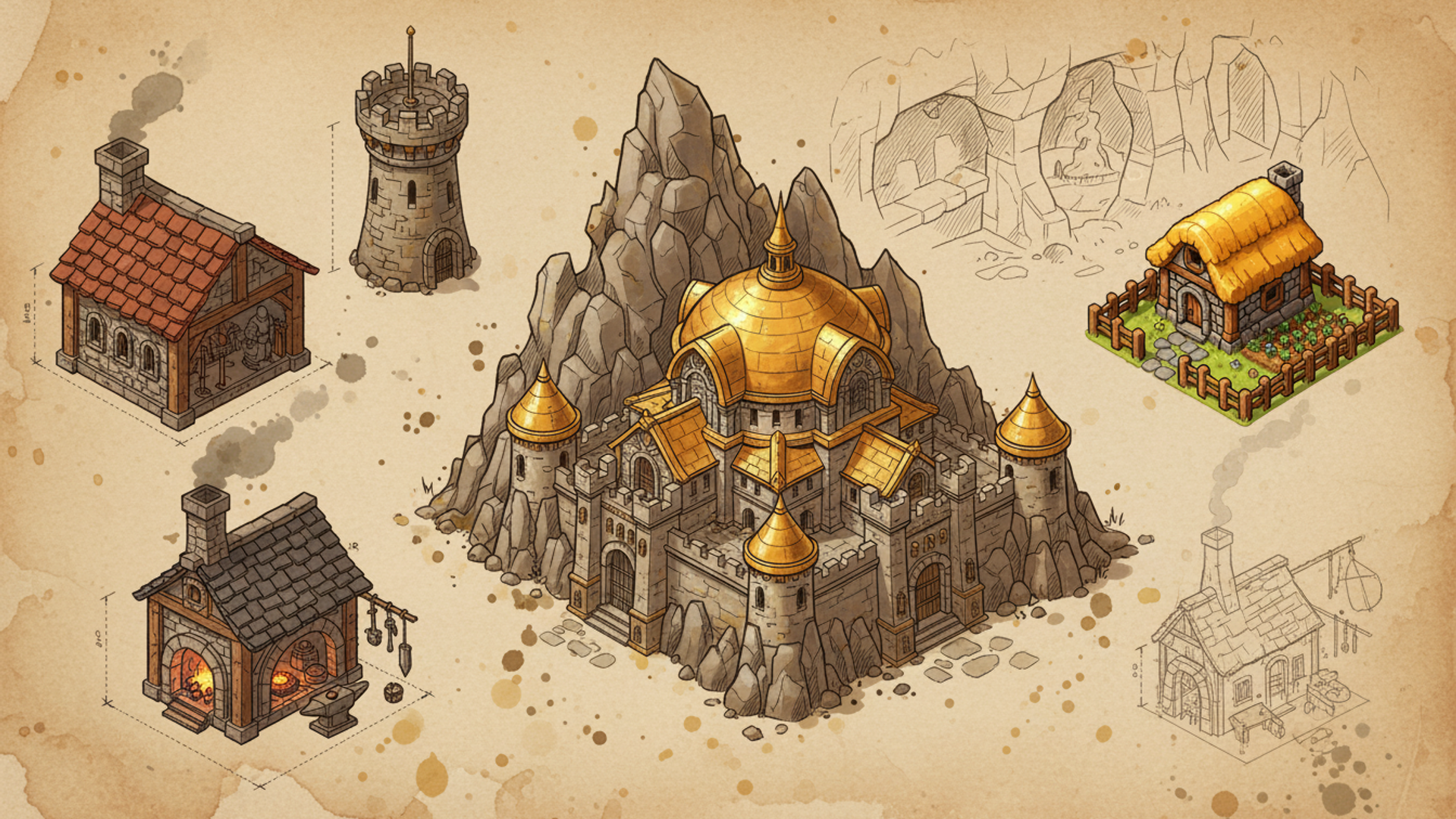
Adam asked for this the way he asks for everything here. He does not read the source and never has, so the request was not a format, a service or a pipeline. It was that the buildings should be real objects standing in the world rather than pictures pinned to the ground, and it arrived in a list with several other things he wanted that week.
The ask before that one was vaguer still: dwarves and goblins, shaped like the classic RTS games, a hall and a barracks and a farm because that is what those games had. He has never written a building description. Every brief quoted below was written by the agent, out of an idea that loose.
What that turned into is a chain with twelve links in it, and only the first one is his.
Two generative services do the heavy lifting, and it is worth saying plainly what each one is before the pipeline starts referring to them.
An image model takes a paragraph of text, plus optionally some reference pictures, and returns a picture. This project uses Gemini's image generation, and what it produces here is the flat painted sprite you see on the map in the 2D renderer.
An image-to-3D service takes a single picture of an object and returns a solid 3D model of it: a mesh of triangles with a texture wrapped around it, in a standard file a game engine can open. You hand it an image, it thinks for a few minutes, and you download a model. It is not modelling software and there is nothing to drive: there are no viewports, no vertices to push and no artist in the loop. There is an HTTP endpoint, a price per job, and a queue.
This project uses Meshy for that second step. It bills
in credits per generation, allows a fixed number of jobs in flight per API key,
and returns glTF binary files, .glb, which is
the format three.js and most other web renderers load natively. Tripo, Rodin and
Stable Fast 3D are the obvious alternatives and the pipeline below would not
change much for any of them, because the interesting parts are what you feed it
and what you do with what comes back.
The short version of why this works at all: a building is a rigid object. It has no skeleton, no joints and no animation, so there is no way for the result to be subtly wrong in a way you would only discover later. It is either the right shape or it is not, and you can see which in one look. Units, which have legs, are a completely different job, and the last section of this post comes back to them.
Human
A loose ask
A faction and a feeling: classic RTS shaped, dwarves who build in stone and brass
Agent
Written brief
The agent turns that into one paragraph per building: what it is made of and what it is for
Agent
Shared style sentence
The same art direction sentence is appended to every prompt in the game
Agent
Style reference
An already-finished sibling is attached as a picture, not described in words
Upgrade tiers reference the tier below, so a stronghold grows out of its own hold
Service
Image generation
The building comes back painted on a flat magenta field
Agent
Cut and size
Background flood-filled from the edges, holes filled, cropped, resized from the grid footprint
Agent
Publish the sprite
The finished sprite goes up to public storage
The 3D service reads it over the open web, so an unsynced sprite fails the run
Service
Image to 3D
The sprite goes in as both shape reference and texture reference
Half finish inside 5 minutes, nine in ten inside 11
Agent
Import and wire
The building's definition is edited to name the model
Skip this and the game silently keeps drawing the flat sprite
Agent
Cap and compress textures
Capped at 1024 and re-encoded so the card reads them still compressed
Worth it at 1024, marginal at 512, noise at 256
Agent
Cut the distance ladder
Simpler meshes for distance, cut from the compressed model rather than the raw one
Agent
Ship it
Object storage the game streams from
Storage is charged, serving is not
- Humana person writes it or decides it
- Agentthe coding agent does it, in the repository
- Servicean outside API does it, billed and rate limited
Every building starts as a written brief
Nothing here starts from a photograph or a piece of concept art. Every building has a written brief behind it, one paragraph long and specific to the point of being a bit obsessive. The dwarven engineers' workshop is a stone workshop with brass gears on the roof, a steam chimney puffing, cogs and pipes visible. The homestead is a tiny cute stone cottage with a golden thatched roof, a small crop garden and a wooden fence.
Adam typed none of those. The agent wrote every one of them, expanded out of an ask that never got more precise than "dwarves, like the classics". That is the part worth sitting with: the brief is where every visual decision in this pipeline is actually made, and it is made by the same thing that wrote the code that consumes it. The brass gears on the workshop roof are not a request anybody made. They are what "dwarven engineers" turned into on the way through.
Those paragraphs are the whole of the art direction for a given building, and they get one thing appended before they reach Gemini: a single shared style sentence carried by every prompt in the game. It asks for 90s real-time strategy pixel art in an isometric three-quarter view, bright and cartoony, saturated, bold clean outlines, chunky proportions, warm lighting. Then it spends as many words again on what the picture must not be: not realistic, not dark, not gritty, not photorealistic, not flat top-down. It also bans pure white, because white is what the cutting stage later has to treat as meaningful.
That shared sentence does more work than the per-building paragraph. The brief makes a forge different from a farm. The style sentence makes both of them look like they came from the same game.
Keeping hundreds of generated assets in one art style
A style paragraph will hold maybe a dozen images together. It will not hold three hundred. Ask for "bright cartoony isometric pixel art" thirty times and you get thirty answers that are each individually correct and collectively a jumble, because the words leave enormous room and the model fills that room differently every time.
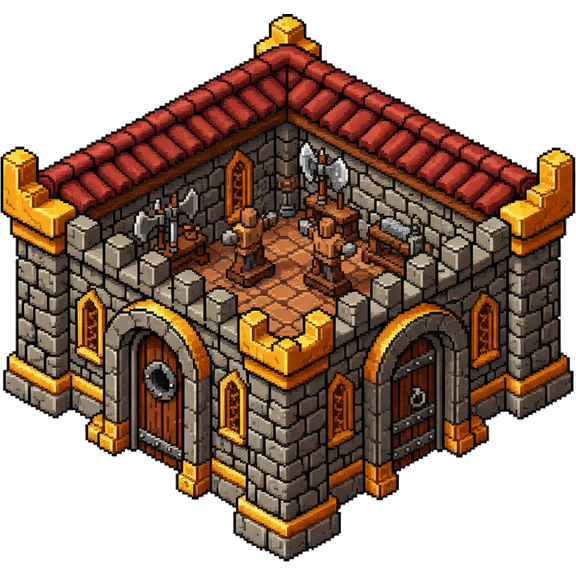
So the prompt is only half of what gets sent. Every building is also handed a picture: an already-generated building from this same game, attached to the request as a reference. The image model is not being asked to imagine the house style from an adjective. It is looking at the house style.
The rule for which picture gets attached has three steps, in order.
If the building is an upgraded tier, it references the tier below it. The stronghold is generated after the mountain hold and is shown the mountain hold, with an instruction that this version must read as visibly bigger, taller and more impressive. That is why the tiers in this game look like the same building growing rather than three unrelated buildings sharing a slot.
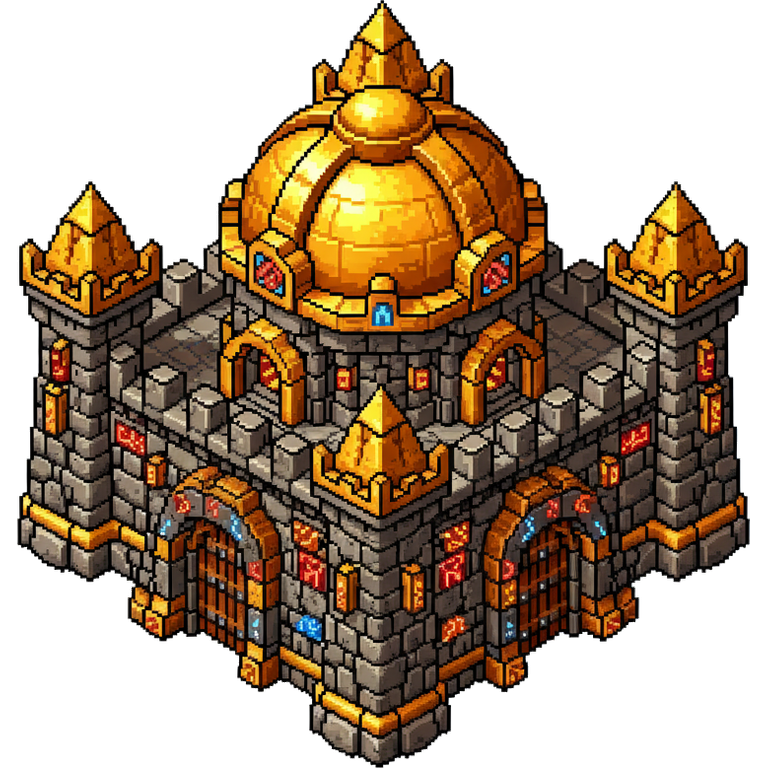
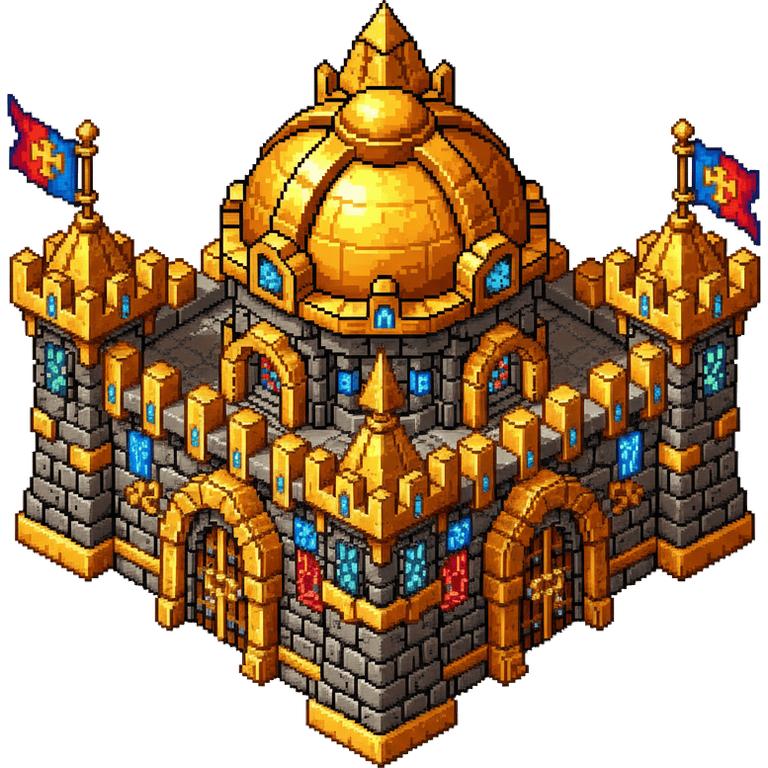
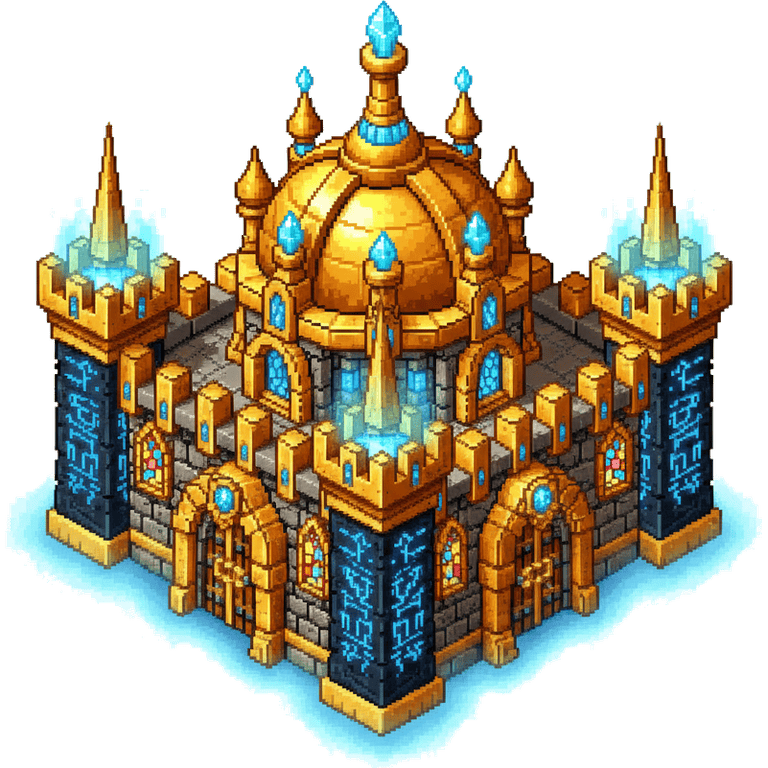
Read those left to right and the family resemblance is not a coincidence, it is the reference chain. The image model was never told what a dwarf roof pitch is. It was shown one, three times.
If it is not an upgrade but names a specific sibling, it gets that one. The neutral buildings hold together this way: a mercenary camp was painted first, and the item shop, the aerie and the rest are all shown the camp.
If neither applies, it gets the first building that was ever generated in the run. The first sprite out of the machine quietly becomes the house style for everything after it, which sounds fragile and is, so the first one is the one worth looking at hardest.
Turning a generated image into a usable sprite
What comes back is not a sprite. It is a picture of a building sitting on a flat magenta field, and the field has to go without taking any of the building with it.
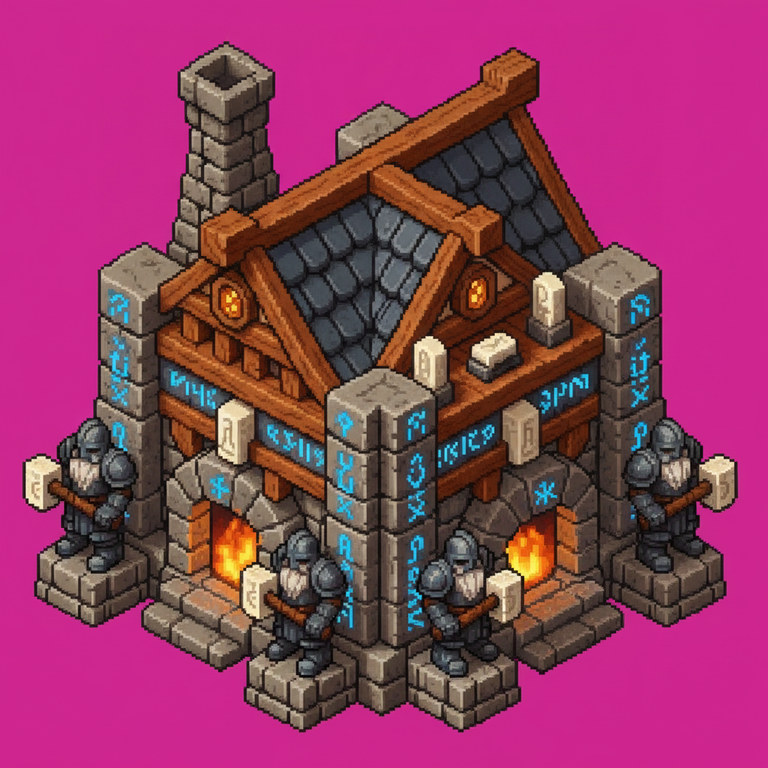
1024 x 1024, opaque
Field sampled at 205, 39, 143, not #FF00FF
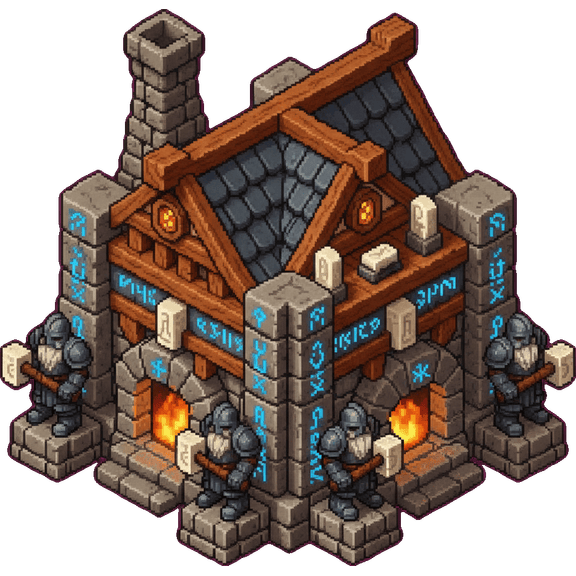
576 x 576, transparent
Cut, repaired, cropped, resized from the 3x3 footprint
The number under the left panel is the whole reason the cut is written the way it is. The field in that image is not pure magenta and never is: sampled at four corners it runs 204 to 208 red, 38 to 46 green, 141 to 145 blue, and the next generation will be somewhere else again. A fixed target colour with a tolerance around it either misses the pale plates or starts eating dwarf skin.
So the cut works by region rather than by colour. It starts from every magenta-looking pixel along the four edges of the frame and spreads inward, clearing only what it can reach, so a pink highlight enclosed inside the building survives untouched. A repair pass then fills the holes anti-aliasing left where a pale roof met the field, and the picture is trimmed to the building and placed into a frame whose size is arithmetic rather than taste: one tile of grid footprint is worth 192 pixels, so a three-tile barracks is 576 across and a four-tile town hall is 768. That stage has its own post, five passes of unglamorous pixel work, and it matters here because the sprite it produces is the only thing the 3D stage ever sees.
Last, the sprite is published to public web storage, and that step is not optional. Meshy is handed a URL, not a file: the request says "the picture is at this address" and the service fetches it itself, over the open internet. A sprite sitting on a laptop therefore does not exist as far as the generation is concerned, and a run that skips the upload fails every job for a reason that looks nothing like a missing upload. Every run checks the public address resolves before it spends anything, because the alternative is discovering it thirty jobs later, having paid for all thirty.
A building is four pictures, not one
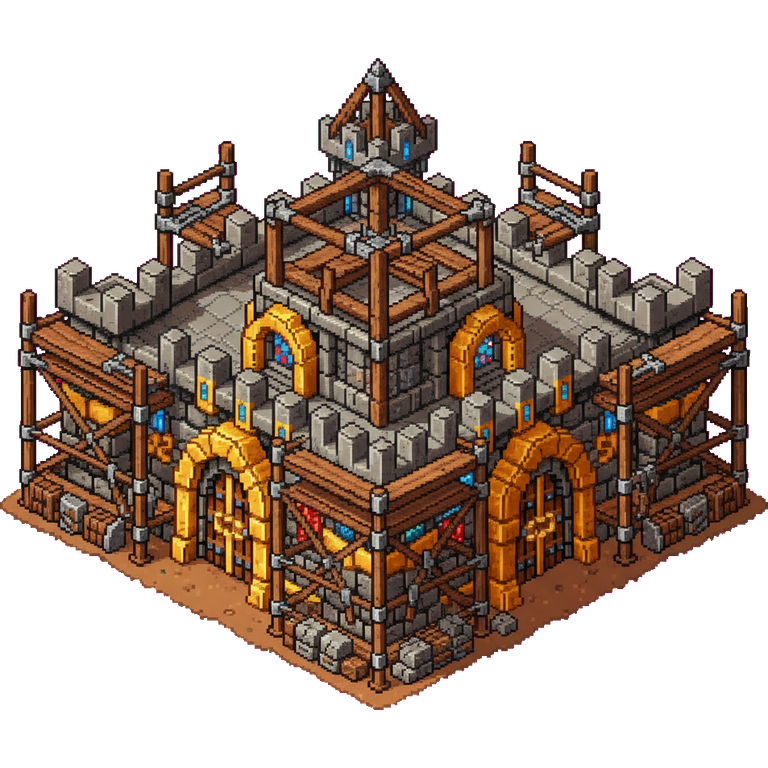
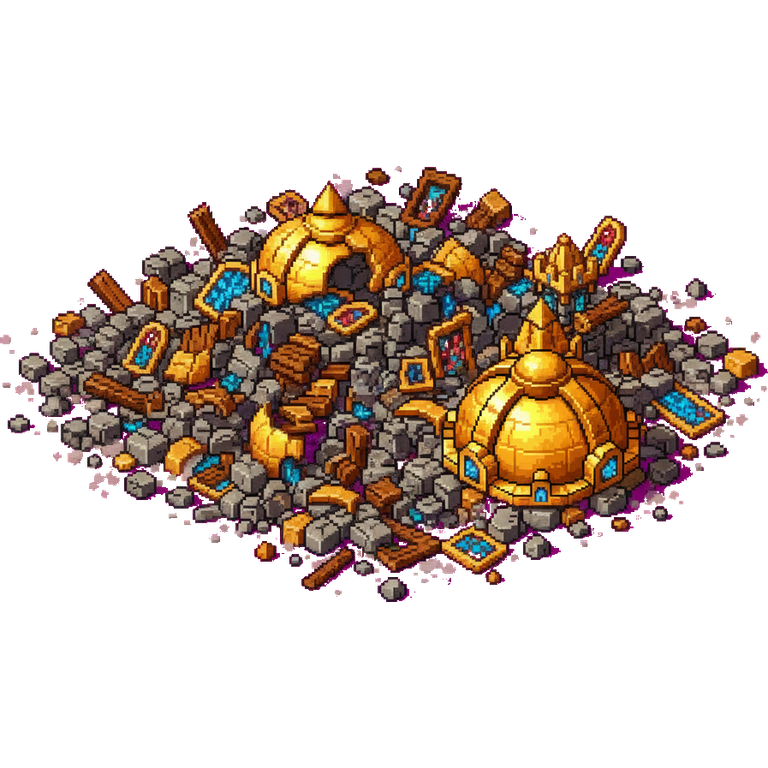
The finished sprite is the one that gets turned into a model, but it is not the only one the 2D game needs. A building in the flat renderer has a life: it is staked out, it is half-built, it stands, and then a catapult knocks it down. Each of those is its own generated picture, and each is generated from the one before it.
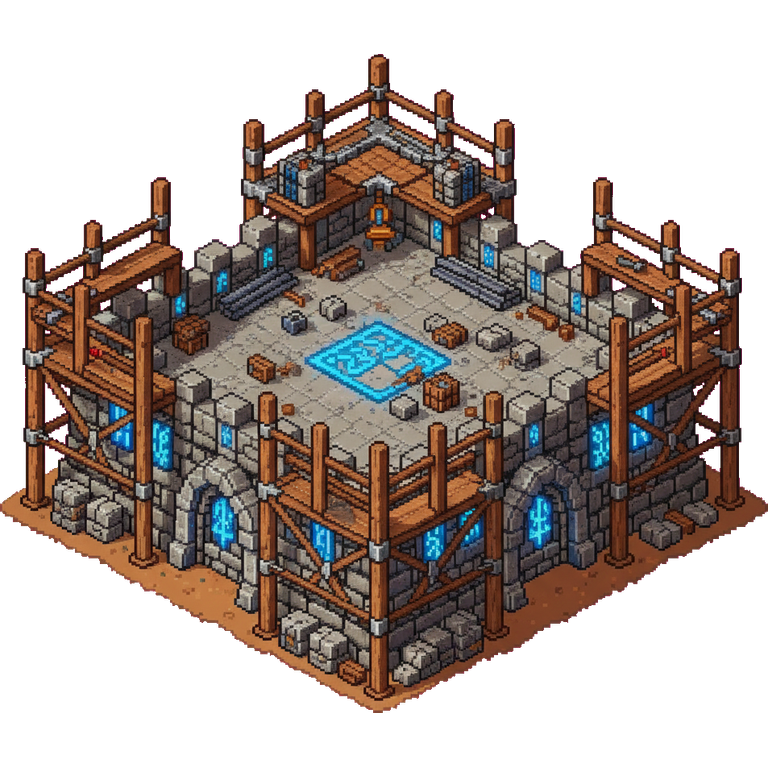
Stage 1
Shown under 50% built
Stage 2
Shown from 50%
Complete
Destroyed
Decays away on a timer
The order they were made in is the reverse of the order you see them. The finished building is painted first. The shell is generated from a picture of the finished building, with instructions to take the roof off and put scaffolding round it; the foundation is generated from a picture of the shell, taken back further to a footprint and some framing. The rubble is generated from the finished building too, with a prompt that spends most of its length insisting that nothing is left standing, because an image model asked for a destroyed building will cheerfully hand back a slightly damaged one.
That chain is why the wreck is worth looking at: the dome in that rubble pile is recognisably the Stronghold's dome, so a player who arrives after the fight can tell what used to be there. Nothing enforced that. It comes from the reference picture being the building itself rather than a generic pile of stones.
All four of those are 2D-only. The 3D renderer builds a building out of the model and animates its construction and its destruction itself, so it has no use for scaffolded or flattened repaints. This is the one place in the pipeline where the two renderers genuinely diverge instead of sharing an asset.
Turning a 2D sprite into a 3D model
Meshy has a perfectly good web interface, and nothing in this post goes near it.
That is the difference between making a model and making three hundred. Clicking
through a browser is a cost paid once per asset, and a POST is not. Everything below is one
HTTP endpoint, called from a script, with the building id threaded through so a
run can be resumed, audited and re-costed. The same script that does one
building does a faction, and would do a thousand buildings without a new idea in
it, only a bigger bill and a longer queue.
The endpoint is POST https://api.meshy.ai/openapi/v1/image-to-3d, with the API
key as a bearer token and this as the body:
const body = {
  image_url: spriteUrl,          // the sprite is the shape reference
  texture_image_url: spriteUrl,  // and the texture reference
  hd_texture: true,
  enable_pbr: false,             // the game grades its own lighting
  symmetry_mode: 'off',          // these buildings are lopsided on purpose
  should_remesh: true,
  target_formats: ['glb'],
};
The same picture goes in twice, once to say what shape to build and once to say what it should look like painted. The rest of those fields are decisions rather than defaults, and two of them control how much geometry you get back.
enable_pbr: false turns off physically based texturing, because the game grades
its own lighting and draws an ink outline over the top, so a generated metallic
and roughness set would fight the look rather than add to it.
symmetry_mode: 'off' is a blunter one: a goblin scrap fortress is meant to look
nailed together out of salvage, and forcing both halves to match tidies it into
something that is no longer a goblin building.
should_remesh: true is the important one. What these models generate as, before
anything cleans them up, is a dense and fairly arbitrary surface — the shape is
right and the triangles are laid out however the reconstruction happened to land.
Remeshing rebuilds that surface with an even distribution of triangles, which is
what makes it possible to simplify predictably afterwards. Skip it and the
decimation step further down behaves very differently on two buildings that look
equally clean.
hd_texture: true asks for the larger of the two texture resolutions the service
offers. That is a decision worth revisiting per project, and this one takes the
big version deliberately, because everything downstream is a reduction and you
cannot get detail back later.
The field that is conspicuously not there is target_polycount, which asks
for a specific triangle budget. Buildings take the default. The units generator
in this project sets it explicitly to 30,000 for ships and siege engines, because
those get drawn large on the faction pages and read badly at less. Both end up in
the same place, and the next section is why that number matters less than it
looks.
That call does not return a model. It returns a task id, immediately, and the
model is somewhere behind it. From there the shape is the same as any other
long-running job API: GET /image-to-3d/{taskId} with the same bearer token
comes back with a status (PENDING, IN_PROGRESS, SUCCEEDED, FAILED) and
a percentage while it works. On success the response carries
model_urls.glb, a URL the script downloads to disk. This project polls every
thirty seconds, deliberately unhurried: a model takes minutes, so polling faster
buys nothing and costs refusals.
Two things about that task id are worth knowing before you write the loop. It is
the only handle you have on work you have already paid for, so it goes to disk
the moment it exists. This project keeps a small .jobs.json next to the
downloads and writes it after every POST and every poll, which is what makes a
crashed run resumable instead of a repeat purchase. And it is scoped to the key
that created it: poll a task with a different key from the pool and you get a
404 rather than the model.
A pre-rendered turntable of the model.
Because the sprite is the brief, the model inherits every decision the painting made. A bad silhouette comes back as a bad mesh. That dependency is why the pipeline that ships those sprites to a browser had to be right first, and it is why a faction's buildings get painted before any of them are turned into geometry.
What it costs
Meshy bills in credits, and image-to-3D with a texture is 30 credits a job here. That is the number to multiply: 298 buildings is roughly 8,900 credits if every one lands first time, and the ledger this project actually kept says 11,070 credits across 387 jobs, which is the same number plus the retries and the ones that came back wrong. Budget about a quarter more than the asset count suggests.
What a credit costs you depends on the plan, and Meshy moves its pricing like everyone else in this market, so check it rather than trusting an arithmetic example in a blog post. The shape of the decision does not move, though: the per-job price is fixed and small, the per-job wait is minutes, and neither scales with how many you run at once. That is what makes a batch worth writing, and it is why the failure mode you actually care about is spending credits on a sprite that was never worth modelling, which is why the sprite is checked before the job is submitted rather than after.
A 402 comes back when the balance runs out. It is worth handling as its own case rather than as a generic failure, because it is the one error where retrying is guaranteed to fail and the whole remaining run is already doomed.
Rate limits: a generation run is a queue, not a burst
What governs a generation run is not how fast you can write requests. It is a concurrency window and a poll interval, and knowing both tells you how long the run takes before you start it. Both generative services in this chain limit you, and they limit you in completely different currencies.
Meshy limits how many jobs you may have in flight. Eighteen per key here, and this project holds two keys, so thirty six can be in the air at once and the thirty seventh waits for a slot.
Refusals come back as 429s in two flavours that mean opposite things, and the
body is the only way to tell them apart. NoMoreConcurrentTasks says the window
is full, and the only cure is a job finishing, so the run sleeps a full minute.
RateLimitExceeded says requests are arriving too quickly, a much smaller
problem, and a couple of seconds is enough. Treating both the same way is the
mistake worth avoiding: sleep a minute on the small one and a run crawls, sleep
two seconds on the big one and you burn twenty attempts learning nothing.
A wave of thirty buildings therefore does not cost thirty waits. It costs one, because they are all in the air together.
The image model limits how much you may generate in a day, which is not a window you can wait out inside a run. There is no useful sleep for a daily quota, so the sprite generator does the only other thing available: it keeps an ordered list of models it is willing to use, and on the first 429 it drops to the next one and carries on. Nano Banana to Nano Banana 2 to Nano Banana Pro, each a little more expensive and a little more capable than the last. Requests are also spaced by a couple of hundred milliseconds by default, which is politeness rather than a limit.
The cascade has a consequence worth stating out loud, because it is the sort of thing that quietly wrecks a set: a batch that starts on one model and finishes on another is a batch generated by two different painters. The style reference picture is what holds it together across that seam, and it is the main reason the reference is a picture rather than an adjective.
Why a finished model still does not appear in the game
A model can be generated, imported, compressed and uploaded, and the game will still draw the flat sprite.
Two places decide whether a model is ever seen, and both test the same thing: a single field on the building's definition that names its model. The renderer picks a mesh over a flat billboard on that field and falls back to the billboard when it is empty, and the in-game model browser builds its gallery by filtering definitions on the same field.
A model on disk plus a successful upload is not a shipped asset. It is a file.
The practical effect is nasty. The two obvious checks, is the file there and did the upload succeed, both pass while the game shows no change at all. That is how a batch of finished models can sit in a bucket for days looking like progress. I stopped relying on the third step being remembered: the generator writes the field itself after each successful import, and refuses to write at all unless the edit it is about to make is exactly the size it expected.
The rule generalises well past this game. A generated asset is not integrated until the code that draws it can find it, and there is always exactly one place that decides. Name that place before you generate anything, whether it is a field on a definition, a manifest entry or an asset catalogue entry. And if it is a manual edit it will eventually be skipped, so it belongs in the generator, written so that running it twice is harmless.
Nothing in this chain checks whether the picture is any good
There is no quality gate anywhere in the chain above. A building that comes back wrong, whether that is a roof that reads as a hat, a silhouette that turns to mush at map zoom or a fortress that quietly obeyed the symmetry setting we turned off, sails through the cut, the upload, the model, the compression and the deploy exactly as fast as a good one.
The obvious fix is a step this project never built. You would write down what a pass looks like, in the same register as the briefs: the silhouette must be readable at map size, the footprint must match the grid the building occupies, no floating geometry, no text, roof present. Then an agent looks at each generation against those rules and re-submits the failures. Every part of that is available: the rules are prose, the looking is a vision model, and the pipeline is already a script that can call one more thing before it downloads.
It was not built because a cheaper check kept clearing the bar. Adam looks at them. A faction is thirty buildings, which is one screenful, and the failures are not subtle. The whole reason a rigid building is a good candidate for image-to-3D is that being wrong is visible, in the way a mislabelled walk cycle is not. Two surfaces make that a two-minute job rather than a chore.
The asset browser is every 2D image the game ships, in one scrolling gallery with categories and a search box. It is built from the asset manifest rather than a list, so a sprite generated five minutes ago appears in it with no wiring at all, and it resolves URLs the same way the game does, so what you are looking at is the actual file a player would get, from the CDN, at the compression it ships at.
The 3D Model Viewer is the same idea for geometry: every unit,
building, hero and item that has a model, by faction, spinning, with the camera
in your hands. It is a screen inside the game rather than a page on this site,
reached from the main menu, which is the one asymmetry between the two. It builds its list by filtering definitions on the model field,
which makes it a second check on the wiring problem from the last section. A
building missing from the gallery has either no model or no modelId, and both
are things you want to find out about now rather than in a match.
The general rule, for anyone weighing up the automated version: an inspection step is worth building when the generation rate outruns Adam's willingness to look, not when the generation rate gets impressive. Thirty buildings an hour and one pair of eyes is a solved problem. Three thousand would not be.
Making a generated model small enough for a browser
What comes out of Meshy is not a game asset. It is a beautiful, completely unshippable object, and it is worth being exact about how unshippable, because the numbers are the entire argument for everything that follows.
Here is the dwarf barracks as it arrives, read straight out of the file:
| Raw Meshy export | |
|---|---|
| File on disk | 20 MB |
| Geometry | 29,956 triangles, 32,322 vertices |
| Base colour texture | 4096 × 4096 JPEG, 13.14 MB |
| Normal map | 2048 × 2048 PNG, 6.56 MB |
| Video memory once loaded | 111.85 MB |
That last row is the one that matters and it is not on the file. A texture is compressed on disk and is not compressed once the graphics card has it, so the 4K base colour alone occupies 89.48 MB of video memory and the normal map another 22.37 MB. For one building.
Now put that in a real-time strategy game. A skirmish map holds dozens of buildings across several factions, and this game ships 298 of them. At a hundred megabytes of video memory each, twelve buildings on screen is more graphics memory than most laptops have in total, before a single unit, tree or terrain texture is loaded. This is not "large and we should tidy it up". It is arithmetically impossible, and no amount of caching or streaming fixes it, because the problem is the resident size rather than the download.
The 30,000 triangles are almost beside the point, which is the thing that surprises people who arrive expecting polycount to be the villain. Modern graphics cards eat triangles. What they do not eat is a hundred megabytes of texture per object, and the ratio between those two costs is why the optimisation below spends most of its effort on the pictures and only then on the geometry.
Three things therefore happen before a player sees it.
The textures are capped at 1024 pixels across and re-encoded to KTX2, which needs a sentence of its own because it is the least famous important format in web 3D. A JPEG or a PNG is compressed for the network: the graphics card cannot read either one, so the browser must unpack it into raw pixels first, and what then sits in video memory is the unpacked size. KTX2 is a container for textures compressed in a format the card reads directly, still compressed, forever. It is usually larger on disk than the equivalent JPEG and dramatically smaller once loaded, which is the opposite trade to the one most asset pipelines are tuned for.
That distinction is the part people miss: the small file you downloaded is not the thing occupying the card. On one dwarf unit that is 1.78 MB down to 0.76 on disk with its texture memory roughly halved, and on the barracks 2.87 MB down to 1.84. The measured limit belongs with the technique: worth it at 1024, marginal at 512, noise at 256, because geometry is a fixed cost that dominates once the pictures are small enough.
Then the distance ladder is cut from the already-compressed model rather than the original, so the textures pass through untouched instead of being unpacked and re-encoded once per rung: about 2 MB carried per rung instead of 15.5. Get that order backwards and you have multiplied your texture cost by the number of rungs, and nothing warns you.
The ladder varies two things independently, which is the part that is hard to picture from prose. Texture size varies at full geometry, for a building filling the screen. Geometry varies at a shared texture, for a building four screens away that is thirty pixels tall. Every rung below is a real file on the CDN, and the size under each button is read from the response header when this page loads, so the numbers are the files rather than a claim about them.
A pre-rendered turntable of the model.
Two things in that row matter more than the individual numbers. The first is where the curve flattens. Dropping the textures from 1024 to 512 takes nearly two thirds off the file; 512 to 256 takes off about half of what is left, and by then you are arguing over half a megabyte while the geometry underneath has not moved at all. That is the whole content of "worth it at 1024, marginal at 512, noise at 256": past a certain point you are shrinking the part that was no longer the problem.
The second is that the rungs are labelled mesh rather than file, and the distinction is the trick. A rung carries no picture of its own. Its texture is an external reference into a shared folder that every rung of that building points at, so the four rungs above cost one image between them instead of four copies of it, and the runtime picks how big that image is by pointing the loader at a different directory. Which is why the 500-triangle rung is 20 KB: it is a mesh and a promise.
Last, it ships. Assets are served from object storage rather than from the web application itself: a bucket you upload files to, which serves them over HTTP and knows nothing about your code. The reason to separate the two is one line of the pricing: storage is charged and serving is not. As of writing, Cloudflare R2 gives 10 GB-month of storage free, charges $0.015 per GB-month beyond that, and does not charge for data transfer out. Operations are charged as well, so this is cheap rather than free, and third-party pricing moves, so check it rather than trusting a blog post from months ago. The point stands regardless: bandwidth is normally the cost that grows with success, and taking that line out means shipping gigabytes of models and audio to every player who turns up is no longer what caps the ambition.
What it takes to add a building, or a whole faction, today
The reason this was worth building: adding a building to an existing faction now runs end to end unattended. Adam names the building he wants. Everything after that, paragraph included, is the chain above.
The wait is the service's rather than ours, so it is worth quoting properly. Across 343 completed jobs, half finished inside 5.2 minutes and nine in ten inside 10.5, with a tail that runs out to about 46. One building is therefore roughly ten minutes of waiting from ask to model in the game, nearly all of it spent on Meshy's queue.
A whole faction is the more interesting number, because a faction is about thirty buildings and thirty fits inside the thirty six that can be in the air at once. The wave costs one wait rather than thirty, and it ends when its slowest member ends rather than its median one. That puts a complete building set for a brand new faction at around an hour, and the writing adds nothing to that, because thirty paragraphs are a few minutes of the same agent that is already running.
| Job | Wall clock | Where the time goes |
|---|---|---|
| One new building | About 10 minutes | Waiting on one image-to-3D job |
| A faction's full building set | About an hour | Waiting on the slowest job in one wave |
What Adam still owes it is the looking. Not the writing: deciding that what came back is wrong is the one piece of judgement no part of this can do for itself, and it survives precisely because it is a reaction to a finished thing rather than a description of an unfinished one. Units are a different story, and the ones with legs stop the machine dead.
Every model this pipeline produced arrived carrying the same exporter default that cost the project a doubled fill rate for months, so audit the defaults on a fleet you did not author. The next faction will be written first, painted second and generated third, because the order is the only part of this that is not negotiable.


